Claude Agent Skills 第一性原理深度解析
Claude 的 Agent Skills(智能体技能)系统代表了一种复杂的基于提示词的元工具(meta-tool)架构,它通过 specialized instruction injection(专用指令注入)扩展了大语言模型的能力。与传统的函数调用或代码执行不同,skills 通过提示词扩展和上下文修改来改变 Claude 处理后续请求的方式,而无需编写可执行代码。
本文从第一性原理出发,深入解构 Claude 的 Agent Skills 系统,记录了一种名为”Skill”的工具如何作为元工具将领域特定的提示词注入对话上下文的架构。我们将以 skill-creator 和 internal-comms 技能为案例,完整梳理其生命周期,从文件解析到 API 请求结构,再到 Claude 的决策过程。
Claude 使用 Skills 来提升其在特定任务中的表现。Skills 被定义为包含指令、脚本和资源的文件夹,Claude 可以在需要时加载它们。Claude 使用声明式的、基于提示词的系统来进行技能的发现和调用。AI 模型(Claude)根据系统提示中呈现的文本描述来决定是否调用 skills。在代码层面没有算法性的 skill 选择或 AI 驱动的意图检测。决策完全发生在 Claude 的推理过程中,基于所提供的技能描述。
Skills 不是可执行代码。它们不运行 Python 或 JavaScript,背后也没有 HTTP 服务器或函数调用。它们也没有硬编码到 Claude 的系统提示中。Skills 存在于 API 请求结构的独立部分。
那么它们到底是什么?Skills 是专用的提示词模板,将领域特定的指令注入到对话上下文中。当一个 skill 被调用时,它会同时修改对话上下文(通过注入指令提示词)和执行上下文(通过更改工具权限并可能切换模型)。skills 不会直接执行动作,而是扩展为详细的提示词,让 Claude 准备好解决特定类型的问题。每个 skill 都作为动态添加出现在 Claude 所看到的工具模式中。
当用户发送请求时,Claude 会收到三样东西:用户消息、可用的工具(Read、Write、Bash 等),以及 Skill 工具。Skill 工具的描述包含一个格式化列表,列出了所有可用技能的 name、description 等字段。Claude 阅读这个列表,并用其原生的语言理解能力将你的意图与技能描述进行匹配。如果你说”帮我创建一个记录日志的 skill”,Claude 会看到 internal-comms 技能的描述(“当用户想要以公司喜欢的格式撰写内部通讯时使用”),识别出匹配项,然后调用 Skill 工具并传入 command: "internal-comms"。
术语说明:
Skill工具(大写 S)= 管理所有技能的元工具。它出现在 Claude 的tools数组中,与 Read、Write、Bash 等并列。- skills(小写 s)= 单独的技能,如
skill-creator、internal-comms。这些是Skill工具加载的专用指令模板。
以下是 Claude 使用 skills 的更直观的表示。
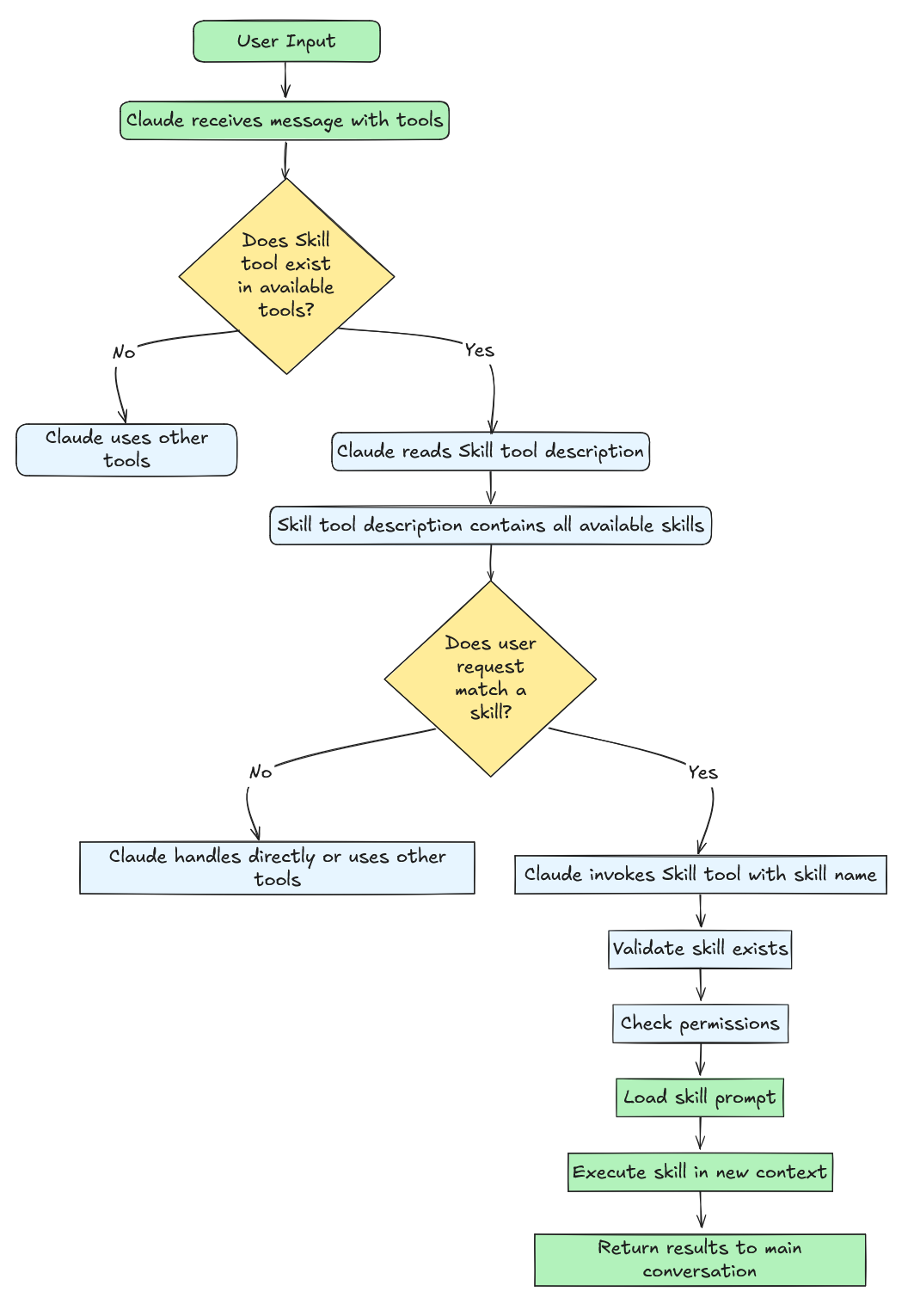
技能选择机制在代码层面没有算法路由或意图分类。Claude Code 不使用嵌入、分类器或模式匹配来决定调用哪个技能。相反,系统将所有可用技能格式化为嵌入在 Skill 工具提示词中的文本描述,然后让 Claude 的语言模型来做决策。这是纯粹的 LLM 推理。没有正则表达式,没有关键词匹配,没有基于机器学习的意图检测。决策发生在 Claude 通过 transformer 的前向传播过程中,而不是在应用程序代码中。
当 Claude 调用一个 skill 时,系统遵循一个简单的工作流程:加载一个 markdown 文件(SKILL.md),将其扩展为详细的指令,将这些指令作为新的用户消息注入对话上下文,修改执行上下文(允许的工具、模型选择),然后在这个 enriched 的环境中继续对话。这与传统工具根本不同——传统工具执行并返回结果,而 Skills 让 Claude 准备好 解决问题,而不是直接解决。
下表帮助更好地区分 Tools 和 Skills 及其能力:
| 方面 | 传统工具 | Skills |
|---|---|---|
| 执行模型 | 同步、直接 | 提示词扩展 |
| 目的 | 执行特定操作 | 指导复杂工作流 |
| 返回值 | 即时结果 | 对话上下文 + 执行上下文变更 |
| 示例 | Read、Write、Bash | internal-comms、skill-creator |
| 并发性 | 通常安全 | 非并发安全 |
| 类型 | 多种 | 始终为 "prompt" |
构建 Agent Skills
Section titled “构建 Agent Skills”现在让我们以 Anthropic 技能仓库中的 skill-creator Skill 为案例,深入研究如何构建 Skills。提醒一下,agent skills 是有组织的指令、脚本和资源文件夹,agents 可以动态发现和加载它们,以便在特定任务中表现得更好。Skills 通过将你的专业知识打包为可组合的资源来扩展 Claude 的能力,将通用 agents 转变为适合你需求的专用 agents。
关键洞察:Skill = 提示词模板 + 对话上下文注入 + 执行上下文修改 + 可选的数据文件和 Python 脚本
每个 Skill 都在一个名为 SKILL.md(不区分大小写)的 markdown 文件中定义,并可选择将文件存储在 /scripts、/references 和 /assets 下。这些捆绑文件可以是 Python 脚本、shell 脚本、字体定义、模板等。以 skill-creator 为例,它包含 SKILL.md、LICENSE.txt(许可证),以及 /scripts 文件夹下的几个 Python 脚本。skill-creator 没有任何 /references 或 /assets。
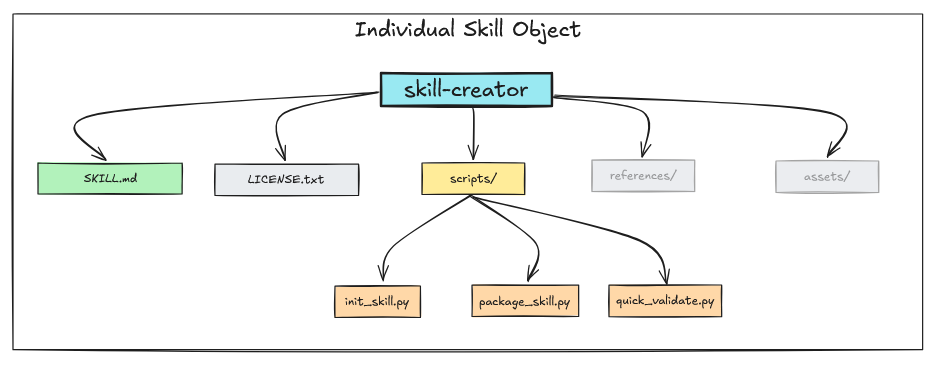
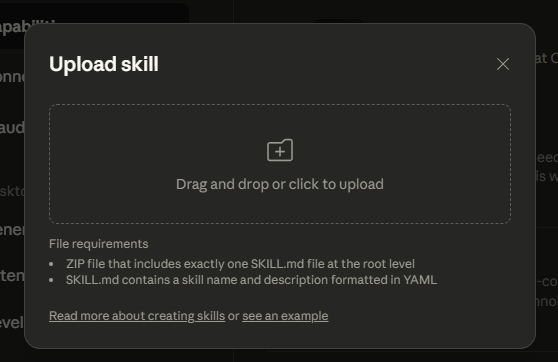
Skills 从多个来源被发现和加载。Claude Code 扫描用户设置(~/.config/claude/skills/)、项目设置(.claude/skills/)、插件提供的 skills,以及内置 skills,来构建可用 skills 列表。对于 Claude Desktop,我们可以上传自定义 skill。
注意: 构建 Skills 最重要的概念是渐进式披露(Progressive Disclosure)——展示足够的信息来帮助 agents 决定下一步做什么,然后在需要时揭示更多细节。对于
agent skills来说:
- 披露 Frontmatter:最小化(name、description、license)
- 如果选择了
skill,加载 SKILL.md:全面但有重点- 然后在
skill执行时加载辅助资源、references 和脚本
编写 SKILL.md
Section titled “编写 SKILL.md”SKILL.md 是 skill 提示词的核心。它是一个遵循两部分结构的 markdown 文件——frontmatter 和 content。Frontmatter 配置 skill 如何运行(权限、模型、元数据),而 markdown 内容告诉 Claude 要做什么。Frontmatter 是用 YAML 编写的 markdown 文件头部。
┌─────────────────────────────────────┐│ 1. YAML Frontmatter(元数据) │ ← 配置│ --- ││ name: skill-name ││ description: 简要概述 ││ allowed-tools: "Bash, Read" ││ version: 1.0.0 ││ --- │├─────────────────────────────────────┤│ 2. Markdown 内容(指令) │ ← Claude 的提示词│ ││ 目的说明 ││ 详细指令 ││ 示例和指南 ││ 逐步流程 │└─────────────────────────────────────┘Frontmatter
Section titled “Frontmatter”Frontmatter 包含控制 Claude 发现和使用 skill 的元数据。以下是 skill-creator 的 frontmatter 示例:
---name: skill-creatordescription: Guide for creating effective skills. This skill should be used when users want to create a new skill (or update an existing skill) that extends Claude's capabilities with specialized knowledge, workflows, or tool integrations.license: Complete terms in LICENSE.txt---让我们逐一了解 frontmatter 的字段。

name(必填)
Section titled “name(必填)”不言自明。skill 的名称。skill 的 name 在 Skill Tool 中用作 command。
skill的name在Skill Tool中用作command。
description(必填)
Section titled “description(必填)”description 字段简要概括了 skill 的功能。这是 Claude 用来决定何时调用 skill 的主要信号。在上面的示例中,描述明确说明了”This skill should be used when users want to create a new skill”——这种清晰的、面向行动的语言帮助 Claude 将用户意图与技能能力匹配。
系统会自动在描述后面附加来源信息(如 "(plugin:skills)"),这有助于在加载多个 skills 时区分不同来源的 skills。
when_to_use(未文档化——可能已弃用或未来功能)
Section titled “when_to_use(未文档化——可能已弃用或未来功能)”⚠️ 重要说明:
when_to_use字段在代码库中大量出现,但在任何 Anthropic 官方文档中都没有记录。这个字段可能是:
- 正在被淘汰的已弃用功能
- 尚未正式支持的内部/实验性功能
- 尚未发布的计划功能
建议:依赖详细的
description字段。在when_to_use出现在官方文档之前,避免在生产 skills 中使用它。
尽管未文档化,以下是 when_to_use 目前在代码库中的工作方式:
function formatSkill(skill) {  let description = skill.whenToUse    ? `${skill.description} - ${skill.whenToUse}`    : skill.description;
return `"${skill.name}": ${description}`;}当存在时,when_to_use 会用连字符附加到描述后面。例如:
"skill-creator": Create well-structured, reusable skills... - When user wants to build a custom skill package with scripts, references, or assets这是 Claude 在 Skill 工具提示词中看到的内容。但是,由于这种行为未文档化,它可能会在将来的版本中更改或删除。更安全的方法是直接在 description 字段中包含使用指南,如 skill-creator 示例所示。
license(可选)
Section titled “license(可选)”不言自明。
allowed-tools(可选)
Section titled “allowed-tools(可选)”allowed-tools 字段定义了 skill 可以无需用户批准而使用的工具,类似于 Claude 的 allowed-tools。
这是一个逗号分隔的字符串,会被解析为允许的工具名称数组。你可以使用通配符来限定权限范围,例如 Bash(git:*) 只允许 git 子命令,而 Bash(npm:*) 允许所有 npm 操作。skill-creator 使用 "Read,Write,Bash,Glob,Grep,Edit" 来获得广泛的文件和搜索能力。一个常见的错误是列出所有可用工具,这会带来安全风险并破坏安全模型。
只包含你的 skill 真正需要的——如果你只是读写文件,
"Read,Write"就足够了。
# ✅ skill-creator 允许使用多个工具allowed-tools: "Read,Write,Bash,Glob,Grep,Edit"
# ✅ 仅特定的 git 命令allowed-tools: "Bash(git status:*),Bash(git diff:*),Bash(git log:*),Read,Grep"
# ✅ 仅文件操作allowed-tools: "Read,Write,Edit,Glob,Grep"
# ❌ 不必要的攻击面allowed-tools: "Bash,Read,Write,Edit,Glob,Grep,WebSearch,Task,Agent"
# ❌ 不必要的攻击面(所有 npm 命令)allowed-tools: "Bash(npm:*),Read,Write"model(可选)
Section titled “model(可选)”model 字段定义 skill 可以使用的模型。默认继承用户会话中的当前模型。对于代码审查等复杂任务,skills 可以请求更强大的模型,如 Claude Opus 或其他国产开源模型。IYKYK(你懂的)。
model: "claude-opus-4-20250514" # 使用特定模型model: "inherit" # 使用会话当前模型(默认)version、disable-model-invocation 和 mode(可选)
Section titled “version、disable-model-invocation 和 mode(可选)”Skills 支持三个可选的 frontmatter 字段用于版本控制和调用控制。version 字段(如 version: “1.0.0”)是用于跟踪 skill 版本的元数据字段,从 frontmatter 中解析,但主要用于文档和 skill 管理。
disable-model-invocation 字段(布尔值)阻止 Claude 通过 Skill 工具自动调用该 skill。设置为 true 时,该 skill 会从显示给 Claude 的列表中排除,只能由用户通过 /skill-name 手动调用,非常适合危险操作、配置命令或需要显式用户控制的交互式工作流。
mode 字段(布尔值)将 skill 归类为”模式命令”,用于修改 Claude 的行为或上下文。设置为 true 时,该 skill 会出现在 skills 列表顶部的特殊”Mode Commands”区域(与常规 utility skills 分开),适用于 debug-mode、expert-mode 或 review-mode 等建立特定操作上下文或工作流的 skills。
SKILL.md 提示词内容
Section titled “SKILL.md 提示词内容”Frontmatter 之后是 markdown 内容——当 skill 被调用时 Claude 收到的实际提示词。这是你定义 skill 行为、指令和工作流的地方。编写有效 skill 提示词的关键是保持聚焦和使用渐进式披露:在 SKILL.md 中提供核心指令,并引用外部文件获取详细内容。
以下是推荐的内容结构:
---# Frontmatter 在这里---
# [简短目的声明 - 1-2 句话]
## 概述[这个 skill 做什么、何时使用、提供什么]
## 前提条件[需要的工具、文件或上下文]
## 指令
### 步骤 1:[第一个动作][祈使句指令][必要时添加示例]
### 步骤 2:[下一个动作][祈使句指令]
### 步骤 3:[最终动作][祈使句指令]
## 输出格式[如何结构化结果]
## 错误处理[失败时该怎么做]
## 示例[具体使用示例]
## 资源[引用 scripts/、references/、assets/ 如果有的话]例如,skill-creator 包含以下指令,指定了创建 skills 所需的每一步工作流程:
## Skill 创建流程
### 步骤 1:通过具体示例理解 Skill### 步骤 2:规划可复用的 Skill 内容### 步骤 3:初始化 Skill### 步骤 4:编辑 Skill### 步骤 5:打包 Skill
当 Claude 调用这个 skill 时,它会收到完整的提示词作为新指令,并附带基础目录路径。{baseDir} 变量会解析为 skill 的安装目录,允许 Claude 使用 Read 工具加载参考文件:Read({baseDir}/scripts/init_skill.py)。这种模式保持主提示词简洁,同时在需要时提供详细文档。
提示词内容的最佳实践:
-
保持在 5,000 字以内(约 800 行),避免压倒上下文
-
使用祈使句(“分析代码以…”)而不是第二人称(“你应该分析…”)
-
引用外部文件获取详细内容,而不是将所有内容嵌入
-
使用
{baseDir}作为路径,永远不要硬编码绝对路径如/home/user/project/❌ Read /home/user/project/config.json ✅ Read {baseDir}/config.json
当 skill 被调用时,Claude 只能访问 allowed-tools 中指定的工具,如果 frontmatter 中指定了模型,可能会被覆盖。skill 的基础目录路径会自动提供,使捆绑资源可访问。
为 Skill 捆绑资源
Section titled “为 Skill 捆绑资源”当你将支持资源与 SKILL.md 一起捆绑时,Skills 变得强大。标准结构使用三个目录,每个目录服务于特定目的:
my-skill/├── SKILL.md # 核心提示词和指令├── scripts/ # 可执行的 Python/Bash 脚本├── references/ # 加载到上下文的文档└── assets/ # 模板和二进制文件为什么要捆绑资源? 保持 SKILL.md 简洁(5,000 字以内)可以防止压倒 Claude 的上下文窗口。捆绑资源允许你提供详细文档、自动化脚本和模板,而不会使主提示词膨胀。Claude 只在使用渐进式披露时才加载它们。
scripts/ 目录
Section titled “scripts/ 目录”scripts/ 目录包含 Claude 通过 Bash 工具运行的可执行代码——自动化脚本、数据处理器、验证器或执行确定性操作的代码生成器。
例如,skill-creator 的 SKILL.md 像这样引用脚本:
When creating a new skill from scratch, always run the `init_skill.py` script. The script conveniently generates a new template skill directory that automatically includes everything a skill requires, making the skill creation process much more efficient and reliable.
Usage:
```scripts/init_skill.py <skill-name> --path <output-directory>```
The script:  - Creates the skill directory at the specified path  - Generates a SKILL.md template with proper frontmatter and TODO placeholders  - Creates example resource directories: scripts/, references/, and assets/  - Adds example files in each directory that can be customized or deleted
当 Claude 看到这个指令时,它会执行 python {baseDir}/scripts/init_skill.py。{baseDir} 变量会自动解析为 skill 的安装路径,使 skill 在不同环境中可移植。
在以下情况使用 scripts/:复杂的多步操作、数据转换、API 交互,或任何需要精确逻辑(用代码比用自然语言更好地表达)的任务。
references/ 目录
Section titled “references/ 目录”references/ 目录存储 Claude 在被引用时读入其上下文的文档。这是文本内容——markdown 文件、JSON schema、配置模板,或 Claude 完成任务所需的任何文档。
例如,mcp-creator 的 SKILL.md 像这样引用 references:
#### 1.4 学习框架文档
**加载并阅读以下参考文件:**
- **MCP 最佳实践**: [📋 查看最佳实践](./reference/mcp_best_practices.md) - 所有 MCP 服务器的核心指南
**对于 Python 实现,同时加载:**- **Python SDK 文档**: 使用 WebFetch 加载 `https://raw.githubusercontent.com/modelcontextprotocol/python-sdk/main/README.md`- [🐍 Python 实现指南](./reference/python_mcp_server.md) - Python 特定的最佳实践和示例
**对于 Node/TypeScript 实现,同时加载:**- **TypeScript SDK 文档**: 使用 WebFetch 加载 `https://raw.githubusercontent.com/modelcontextprotocol/typescript-sdk/main/README.md`- [⚡ TypeScript 实现指南](./reference/node_mcp_server.md) - Node/TypeScript 特定的最佳实践和示例
当 Claude 遇到这些指令时,它会使用 Read 工具:Read({baseDir}/references/mcp_best_practices.md)。内容被加载到 Claude 的上下文中,提供详细信息而不使 SKILL.md 变得杂乱。
在以下情况使用 references/:详细文档、大型模式库、检查清单、API schema,或任何对于 SKILL.md 来说太冗长但对任务必要的文本内容。
assets/ 目录
Section titled “assets/ 目录”assets/ 目录包含 Claude 通过路径引用但不会加载到上下文的模板和二进制文件。可以将其视为 skill 的静态资源——HTML 模板、CSS 文件、图片、配置样板或字体。
在 SKILL.md 中:
使用 {baseDir}/assets/report-template.html 中的模板作为报告结构。参考 {baseDir}/assets/diagram.png 处的架构图。Claude 看到文件路径但不读取内容。相反,它可能将模板复制到新位置、填充占位符,或在生成的输出中引用路径。
在以下情况使用 assets/:HTML/CSS 模板、图片、二进制文件、配置模板,或任何 Claude 通过路径操作而非读入上下文的文件。
references/ 和 assets/ 之间的关键区别在于:
- references/:通过 Read 工具加载到 Claude 上下文的文本内容
- assets/:仅通过路径引用的文件,不加载到上下文
这对上下文管理很重要。references/ 中的 10KB markdown 文件在加载时会消耗上下文 token。assets/ 中的 10KB HTML 模板不会。Claude 只知道路径存在。
最佳实践: 始终使用
{baseDir}作为路径,永远不要硬编码绝对路径。这使得 skills 在不同用户环境、项目目录和安装之间可移植。
常见 Skill 模式
Section titled “常见 Skill 模式”与工程中的所有事情一样,理解常见模式有助于设计有效的 skills。以下是工具集成和工作流设计中最有用的模式。
模式 1:脚本自动化
Section titled “模式 1:脚本自动化”使用场景: 需要多个命令或确定性逻辑的复杂操作。
这种模式将计算任务卸载到 scripts/ 目录中的 Python 或 Bash 脚本。skill 提示词告诉 Claude 执行脚本并处理其输出。

SKILL.md 示例:
在目标目录上运行 scripts/analyzer.py:
`python {baseDir}/scripts/analyzer.py --path "$USER_PATH" --output report.json`
解析生成的 `report.json` 并展示发现。
所需工具:
allowed-tools: "Bash(python {baseDir}/scripts/*:*), Read, Write"模式 2:读取 - 处理 - 写入
Section titled “模式 2:读取 - 处理 - 写入”使用场景: 文件转换和数据处理。
最简单的模式——读取输入,按照指令转换,写入输出。适用于格式转换、数据清理或报告生成。
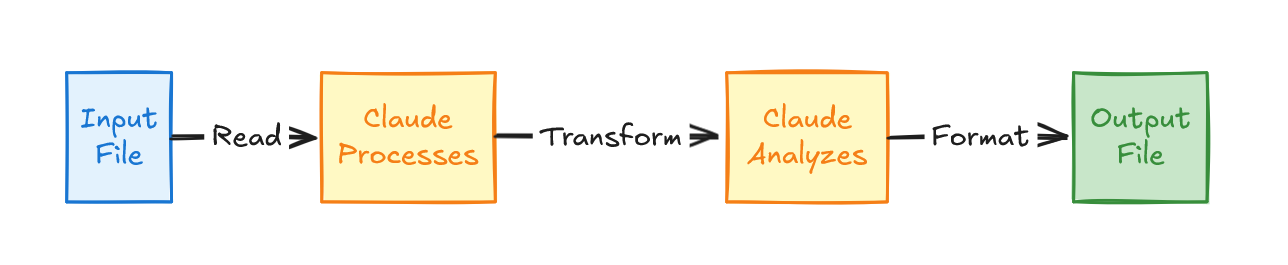
SKILL.md 示例:
## 处理工作流1. 使用 Read 工具读取输入文件2. 根据格式解析内容3. 按照规范转换数据4. 使用 Write 工具写入输出5. 报告完成并附摘要所需工具:
allowed-tools: "Read, Write"模式 3:搜索 - 分析 - 报告
Section titled “模式 3:搜索 - 分析 - 报告”使用场景: 代码库分析和模式检测。
使用 Grep 在代码库中搜索模式,读取匹配文件获取上下文,分析发现,并生成结构化报告。或者,在企业数据存储中搜索数据,分析检索到的数据获取信息,并生成结构化报告。
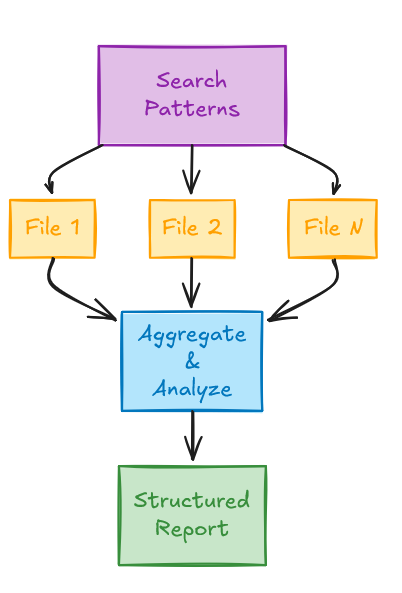
SKILL.md 示例:
## 分析流程1. 使用 Grep 查找相关代码模式2. 读取每个匹配文件3. 分析漏洞4. 生成结构化报告所需工具:
allowed-tools: "Grep, Read"模式 4:命令链执行
Section titled “模式 4:命令链执行”使用场景: 具有依赖关系的多步操作。
执行一系列命令,其中每一步都依赖于前一步的成功。常见于 CI/CD 类工作流。
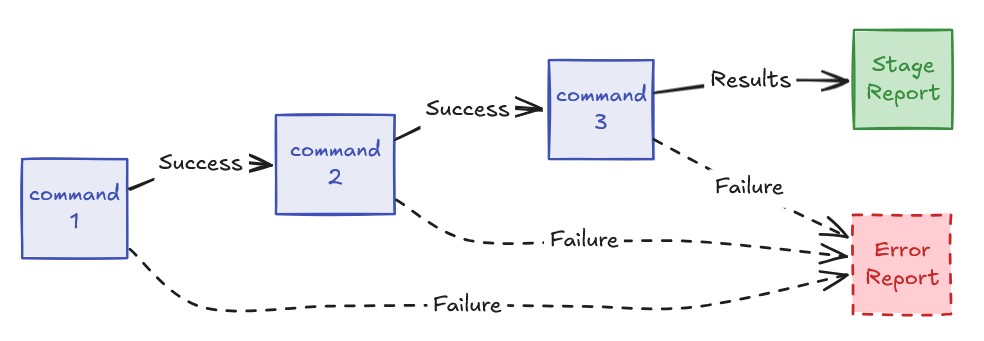
SKILL.md 示例:
执行分析流水线:npm install && npm run lint && npm test
报告每个阶段的结果。
所需工具:
allowed-tools: "Bash(npm install:*), Bash(npm run:*), Read"向导式多步工作流
Section titled “向导式多步工作流”使用场景: 每步都需要用户输入的复杂流程。
将复杂任务分解为离散的步骤,在每个阶段之间进行显式的用户确认。适用于设置向导、配置工具或引导流程。
SKILL.md 示例:
## 工作流
### 步骤 1:初始设置1. 询问用户项目类型2. 验证前提条件是否存在3. 创建基础配置等待用户确认后再继续。
### 步骤 2:配置1. 展示配置选项2. 请用户选择设置3. 生成配置文件等待用户确认后再继续。
### 步骤 3:初始化1. 运行初始化脚本2. 验证设置是否成功3. 报告结果
基于模板的生成
Section titled “基于模板的生成”使用场景: 从存储在 assets/ 中的模板创建结构化输出。
加载模板,用用户提供或生成的数据填充占位符,然后写入结果。常见于报告生成、样板代码创建或文档编写。
SKILL.md 示例:
## 生成流程1. 从 {baseDir}/assets/template.html 读取模板2. 解析用户需求3. 填充模板占位符: - → 用户提供的名称 - → 生成的摘要 - → 当前日期4. 将填充后的模板写入输出文件5. 报告完成使用场景: 需要多次通过且深度递增的流程。
先进行广泛分析,然后对已识别的问题进行逐步深入的挖掘。适用于代码审查、安全审计或质量分析。
SKILL.md 示例:
## 迭代分析
### 第一轮:广泛扫描1. 搜索整个代码库中的模式2. 识别高层问题3. 分类发现
### 第二轮:深度分析对于每个高层问题:1. 读取完整文件上下文2. 分析根本原因3. 确定严重程度
### 第三轮:建议对于每个发现:1. 研究最佳实践2. 生成具体修复方案3. 估算工作量
展示包含所有发现和建议的最终报告。使用场景: 整合来自多个来源的信息以构建全面的理解。
从不同文件和工具中收集数据,综合成一幅连贯的画面。适用于项目摘要、依赖分析或影响评估。
SKILL.md 示例:
## 上下文收集1. 读取项目 README.md 获取概述2. 分析 package.json 了解依赖3. 使用 Grep 搜索代码库中的特定模式4. 检查 git 历史记录了解近期变更5. 综合发现为连贯的摘要Agent Skills 内部架构
Section titled “Agent Skills 内部架构”在介绍了概述和构建过程之后,我们现在来检查 skills 在底层是如何工作的。skills 系统通过元工具架构运行,其中一个名为 Skill 的工具充当所有单独 skills 的容器和调度器。这种设计在实现和目的上都将 skills 与传统工具根本区分开来。
Skill工具是管理所有 skills 的元工具
Skills 对象设计
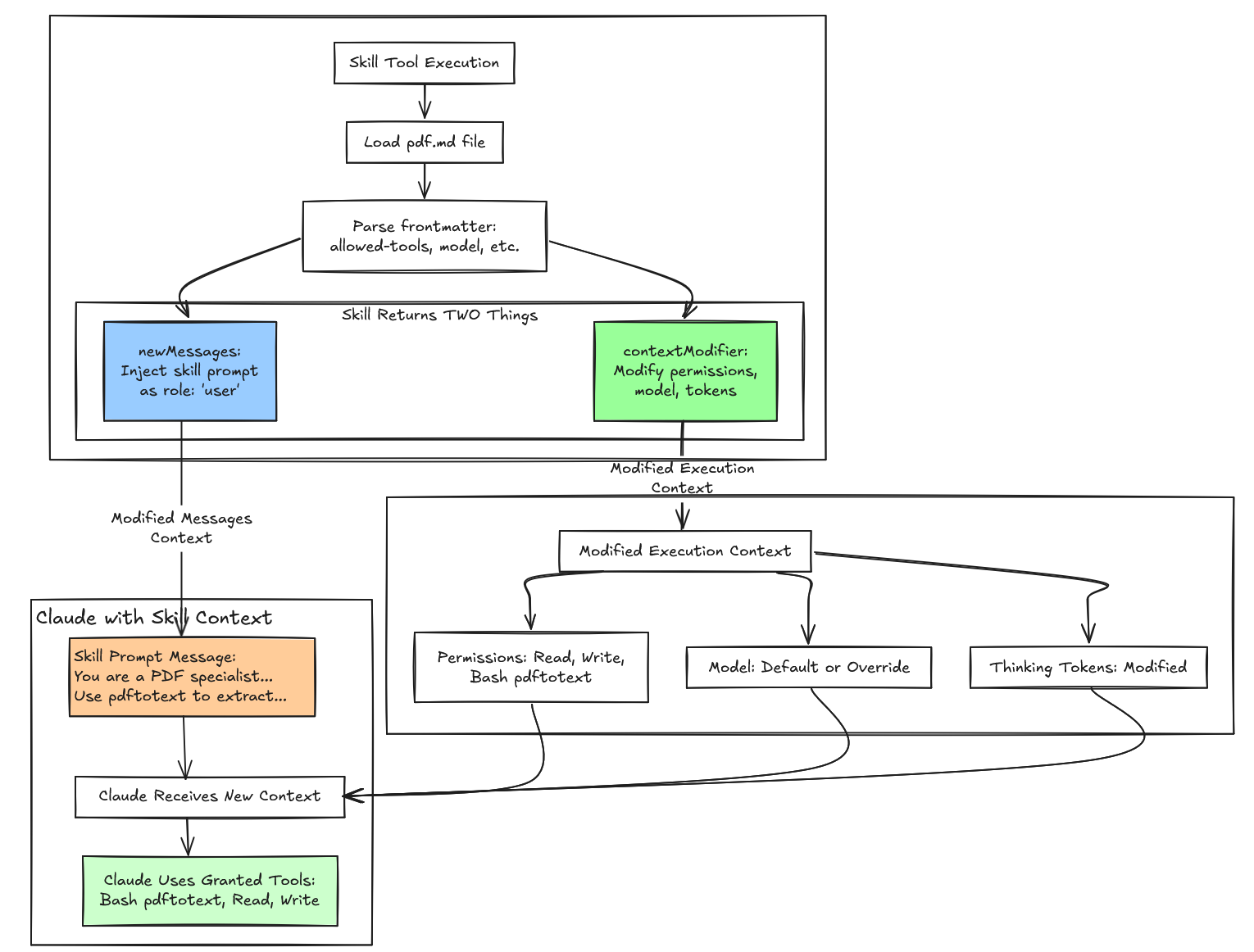
Section titled “Skills 对象设计”像 Read、Bash 或 Write 这样的传统工具执行离散动作并返回即时结果。Skills 的运行方式不同。它们不直接执行动作,而是将专用指令注入对话历史,并动态修改 Claude 的执行环境。这通过两条用户消息实现——一条包含对用户可见的元数据,另一条包含对 UI 隐藏但发送给 Claude 的完整 skill 提示词——并通过修改 agent 的上下文来改变权限、切换模型,以及在 skill 使用期间调整思考 token 参数。
| 特性 | 普通工具 | Skill 工具 |
|---|---|---|
| 本质 | 直接动作执行器 | 提示词注入 + 上下文修改器 |
| 消息角色 | assistant → tool_use user → tool_result | assistant → tool_use Skill user → tool_result user → skill prompt ← 注入! |
| 复杂度 | 简单(3-4 条消息) | 复杂(5-10+ 条消息) |
| 上下文 | 静态 | 动态(每轮修改) |
| 持久性 | 仅工具交互 | 工具交互 + skill 提示词 |
| Token 开销 | 极小(约 100 token) | 显著(每轮约 1,500+ token) |
| 使用场景 | 简单、直接的任务 | 复杂的引导式工作流 |
这种复杂度是巨大的。普通工具生成简单的消息交换——一个 assistant 工具调用后跟一个 user 结果。Skills 注入多条消息,在动态修改的上下文中运行,并携带显著的 token 开销,以提供引导 Claude 行为的专用指令。
理解 Skill 元工具如何工作揭示了该系统的机制。让我们检查它的结构:
Pd = {  name: "Skill",  // 工具名称常量:$N = "Skill"
  inputSchema: {    command: string  // 例如 "pdf"、"skill-creator"  },
  outputSchema: {    success: boolean,    commandName: string  },
  // 🔑 关键字段:这生成 skills 列表  prompt: async () => fN2(),
  // 验证和执行  validateInput: async (input, context) => { /* 5 个错误码 */ },  checkPermissions: async (input, context) => { /* allow/deny/ask */ },  call: async *(input, context) => { /* 产出消息 + 上下文修改器 */ }}
prompt 字段将 Skill 工具与 Read 或 Bash 等具有静态描述的工具区分开来。Skill 工具不使用固定字符串,而是使用动态提示词生成器,在运行时通过聚合所有可用 skills 的名称和描述来构建其描述。这实现了渐进式披露——系统只将最小元数据(来自 frontmatter 的 skill 名称和描述)加载到 Claude 的初始上下文中,提供足够的信息让模型决定哪个 skill 匹配用户意图。完整的 skill 提示词只在 Claude 做出选择后才加载,防止上下文膨胀同时保持可发现性。
async function fN2() {  let A = await atA(),    {      modeCommands: B,      limitedRegularCommands: Q    } = vN2(A),    G = [...B, ...Q].map((W) => W.userFacingName()).join(", ");  l(`Skills and commands included in Skill tool: ${G}`);  let Z = A.length - B.length,    Y = nS6(B),    J = aS6(Q, Z);  return `Execute a skill within the main conversation
<skills_instructions>When users ask you to perform tasks, check if any of the available skills below can help complete the task more effectively. Skills provide)
How to use skills:
- Invoke skills using this tool with the skill name only (no arguments)
- When you invoke a skill, you will see
The “{name}” skill is loading - The skill’s prompt will expand and provide detailed instructions on how to complete the task
- Examples:
- `command: “pdf”` - invoke the pdf skill
- `command: “xlsx”` - invoke the xlsx skill
- `command: “ms-office-suite:pdf”` - invoke using fully qualified name
Important:
- Only use skills listed in <available_skills> below
- Do not invoke a skill that is already running
- Do not use this tool for built-in CLI commands (like /help, /clear, etc.) </skills_instructions>
<available_skills> ${Y}${J} </available_skills> `; }
与 ChatGPT 等助手的系统提示中某些工具不同,Claude agent skills 不在系统提示中。它们作为 Skill 工具描述的一部分存在于 tools 数组中。各个 skill 的名称表示为 Skill 元工具输入 schema 的 command 字段。为了更好地可视化其外观,以下是实际的 API 请求结构:
{ "model": "claude-sonnet-4-5-20250929", "system": "You are Claude Code, Anthropic's official CLI...", // ← 系统提示 "messages": [ {"role": "user", "content": "帮我创建一个新 skill"}, // ... 对话历史 ], "tools": [ // ← 发送给 Claude 的工具数组 { "name": "Skill", // ← 元工具 "description": "Execute a skill...\n\n<skills_instructions>...\n\n<available_skills>\n...", "input_schema": { "type": "object", "properties": { "command": { "type": "string", "description": "The skill name (no arguments)" // ← 单个 skill 的名称 } } } }, { "name": "Bash", "description": "执行 bash 命令...", // ... }, { "name": "Read", // ... } // ... 其他工具 ]}<available_skills> 部分位于 Skill 工具描述中,并针对每个 API 请求重新生成。系统通过聚合当前加载的 skills(来自用户和项目配置、插件提供的 skills 以及任何内置 skills)动态构建此列表,默认受 15,000 字符的 token 预算限制。这种预算约束迫使 skill 作者编写简洁的描述,并确保工具描述不会压倒模型的上下文窗口。
Skill 对话和执行上下文注入设计
Section titled “Skill 对话和执行上下文注入设计”大多数 LLM API 支持理论上可以携带系统提示的 role: "system" 消息。事实上,OpenAI 的 ChatGPT 在其系统提示中携带默认工具,包括用于记忆的 bio、用于任务调度的 automations、用于控制 canvas 的 canmore、用于图像生成的 img_gen、file_search、python 和用于互联网搜索的 web。最后,工具提示占用了其系统提示中约 90% 的 token 计数。这可能有用,但如果我们有很多工具和/或 skills 需要加载到上下文中,则效率不高。
但是,系统消息具有不同的语义,使其不适用于 skills。系统消息设置贯穿整个对话的全局上下文,以高于用户指令的权限影响所有后续轮次。
Skills 需要临时的、有范围的行为。skill-creator skill 应该只影响 skill 创建相关任务,而不是将 Claude 转变为永久的 PDF 专家。使用 role: "user" 和 isMeta: true 使 skill 提示词在 Claude 看来像用户输入,保持其临时性和局部性。skill 完成后,对话恢复正常对话上下文和执行上下文,没有残留的行为修改。
像 Read、Write 或 Bash 这样的普通工具具有简单的通信模式。当 Claude 调用 Read 时,它发送文件路径,接收文件内容,然后继续工作。用户在其记录中看到”Claude 使用了 Read 工具”,这就足够了。工具做了一件事,返回了结果,交互就结束了。Skills 的运行方式根本不同。Skills 不执行离散动作并返回结果,而是注入全面的指令集,修改 Claude 推理和处理任务的方式。这带来了普通工具从未面临的设计挑战:用户需要透明度来了解哪些 skills 在运行以及它们在做什么,而 Claude 需要详细的(可能很冗长的)指令来正确执行 skill。如果用户在聊天记录中看到完整的 skill 提示词,UI 将变得杂乱无章,充满数千字的内部 AI 指令。如果 skill 激活完全隐藏,用户将失去对系统代表他们做什么的可见性。解决方案需要将这两个通信通道分离为具有不同可见性规则的不同消息。
skills 系统在每个消息上使用 isMeta 标志来控制它是否出现在用户界面中。当 isMeta: false(或省略标志且默认为 false)时,消息呈现在用户看到的对话记录中。当 isMeta: true 时,消息作为 Claude 对话上下文的一部分发送给 Anthropic API,但永远不会出现在 UI 中。这个简单的布尔值标志实现了复杂的双通道通信:一个用于人类用户,另一个用于 AI 模型。元工具的元提示词!
当 skill 执行时,系统向对话历史注入两条独立的用户消息。第一条携带 skill 元数据,isMeta: false,作为状态指示器对用户可见。第二条携带完整的 skill 提示词,isMeta: true,对 UI 隐藏但对 Claude 可用。这种分割解决了透明度与清晰度的权衡——向用户展示正在发生的事情,而不会让他们被实现细节淹没。
元数据消息使用简洁的 XML 结构,前端可以解析和适当显示:
let metadata = [  `<command-message>${statusMessage}</command-message>`,  `<command-name>${skillName}</command-name>`,  args ? `<command-args>${args}</command-args>` : null].filter(Boolean).join('\n');
// 消息 1:无 isMeta 标志 → 默认为 false → 可见messages.push({  content: metadata,  autocheckpoint: checkpointFlag});
例如,当 PDF skill 激活时,用户在其记录中看到一个干净的加载指示器:
<command-message>The "pdf" skill is loading</command-message><command-name>pdf</command-name><command-args>report.pdf</command-args>此消息刻意保持最小——通常为 50 到 200 个字符。XML 标签使前端能够以特殊格式渲染它,验证是否存在正确的 <command-message> 标签,并维护会话期间执行了哪些 skills 的审计跟踪。因为 isMeta 标志在省略时默认为 false,所以此元数据会自动出现在 UI 中。
Skill 提示词消息采用相反的方法。它从 SKILL.md 加载完整内容,可能会用额外上下文进行增强,并显式设置 isMeta: true 对用户隐藏:
let skillPrompt = await skill.getPromptForCommand(args, context);
// 如有需要,用 prepend/append 内容增强let fullPrompt = prependContent.length > 0 || appendContent.length > 0  ? [...prependContent, ...appendContent, ...skillPrompt]  : skillPrompt;
// 消息 2:显式 isMeta: true → 隐藏messages.push({  content: fullPrompt,  isMeta: true  // 对 UI 隐藏,发送给 API});
典型的 skill 提示词运行 500 到 5,000 字,提供全面的指导来改变 Claude 的行为。PDF skill 提示词可能包含:
You are a PDF processing specialist.
Your task is to extract text from PDF documents using the pdftotext tool.
## Process
1. Validate the PDF file exists2. Run pdftotext command to extract text3. Read the output file4. Present the extracted text to the user
## Tools Available
You have access to:- Bash(pdftotext:*) - For running pdftotext command- Read - For reading extracted text- Write - For saving results if needed
## Output Format
Present the extracted text clearly formatted.
Base directory: /path/to/skillUser arguments: report.pdf
此提示词建立了任务上下文、概述了工作流、指定了可用工具、定义了输出格式,并提供了环境特定路径。带有标题、列表和代码块的 markdown 结构帮助 Claude 解析和遵循指令。使用 isMeta: true,整个提示词被发送到 API,但永远不会使用户记录变得杂乱。
除了核心元数据和 skill 提示词之外,skills 还可以注入额外的条件消息用于附件和权限:
let allMessages = [ createMessage({ content: metadata, autocheckpoint: flag }), // 1. 元数据 createMessage({ content: skillPrompt, isMeta: true }), // 2. Skill 提示词 ...attachmentMessages, // 3. 附件(条件性) ...(allowedTools.length || skill.model ? [ createPermissionsMessage({ // 4. 权限(条件性) type: "command_permissions", allowedTools: allowedTools, model: skill.useSmallFastModel ? getFastModel() : skill.model }) ] : [])];附件消息可以携带诊断信息、文件引用或补充 skill 提示词的额外上下文。权限消息只在 skill 的 frontmatter 中指定了 allowed-tools 或请求模型覆盖时出现,提供修改运行时执行上下文的元数据。这种模块化组合允许每条消息具有特定目的,并可根据 skill 的配置包含或排除,扩展了基本的两消息模式以处理更复杂的场景,同时通过 isMeta 标志保持相同的可见性控制。
为什么是两条消息而不是一条?
Section titled “为什么是两条消息而不是一条?”单消息设计将迫使一个不可能的选择。设置 isMeta: false 将使整个消息可见,将数千字的 AI 指令倾倒到用户的聊天记录中。用户会看到类似这样的内容:
┌─────────────────────────────────────────────┐│ The "pdf" skill is loading ││ ││ You are a PDF processing specialist. ││ ││ Your task is to extract text from PDF ││ documents using the pdftotext tool. ││ ││ ## Process ││ ││ 1. Validate the PDF file exists ││ 2. Run pdftotext command to extract text ││ 3. Read the output file ││ ... [还有 500 行] ... │└─────────────────────────────────────────────┘UI 将变得不可用,充满了 предназначенных 给 Claude 而不是人类的内部实现细节。或者,设置 isMeta: true 将隐藏所有内容,不提供关于哪个 skill 激活或收到什么参数的透明度。用户将无法看到系统代表他们做什么。
两消息分割通过给每条消息不同的 isMeta 值来解决这个问题。消息 1(isMeta: false)提供面向用户的透明度。消息 2(isMeta: true)为 Claude 提供详细指令。这种细粒度控制实现了透明度而不会信息过载。
这些消息还服务于根本不同的受众和目的:
| 方面 | 元数据消息 | Skill 提示词消息 |
|---|---|---|
| 受众 | 人类用户 | Claude (AI) |
| 目的 | 状态/透明度 | 指令/指导 |
| 长度 | 约 50-200 字符 | 约 500-5,000 字 |
| 格式 | 结构化 XML | 自然语言 markdown |
| 可见性 | 应该可见 | 应该隐藏 |
| 内容 | ”发生了什么?" | "如何做?” |
代码库甚至通过不同的路径处理这些消息。元数据消息被解析 <command-message> 标签、验证并为 UI 显示格式化。Skill 提示词消息直接发送到 API,无需解析或验证——它是仅用于 Claude 推理过程的原始指令内容。将它们结合起来将违反单一责任原则,迫使一条消息通过两条不同的处理管道服务于两个不同的受众。
案例研究:执行生命周期
Section titled “案例研究:执行生命周期”在介绍了 Agent Skills 内部架构之后,让我们通过一个假设的 pdf skill 作为案例研究,来 walkthrough 当用户说”从 report.pdf 提取文本”时会发生什么。
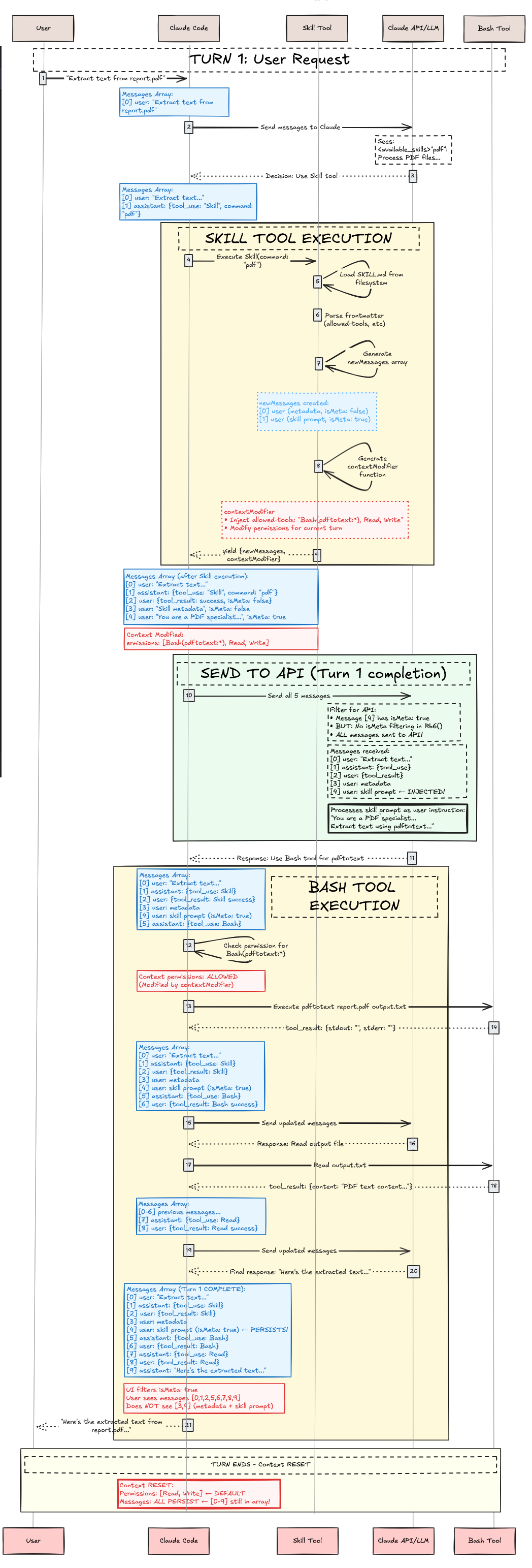
当 Claude Code 启动时,它会扫描 skills:
async function getAllCommands() {  // 从所有来源并行加载  let [userCommands, skillsAndPlugins, pluginCommands, builtins] =    await Promise.all([      loadUserCommands(),      // ~/.claude/commands/      loadSkills(),            // .claude/skills/ + plugins      loadPluginCommands(),    // Plugin-defined commands      getBuiltinCommands()     // Hardcoded commands    ]);
  return [...userCommands, ...skillsAndPlugins, ...pluginCommands, ...builtins]    .filter(cmd => cmd.isEnabled());}
// 加载特定 skillasync function loadPluginSkills(plugin) {  // 检查插件是否有 skills  if (!plugin.skillsPath) return [];
  // 支持两种模式:  // 1. skillsPath 中的根 SKILL.md  // 2. 带有 SKILL.md 的子目录
  const skillFiles = findSkillMdFiles(plugin.skillsPath);  const skills = [];
  for (const file of skillFiles) {    const content = readFile(file);    const { frontmatter, markdown } = parseFrontmatter(content);
    skills.push({      type: "prompt",      name: `${plugin.name}:${getSkillName(file)}`,      description: `${frontmatter.description} (plugin:${plugin.name})`,      whenToUse: frontmatter.when_to_use,  // ← 注意:下划线!      allowedTools: parseTools(frontmatter['allowed-tools']),      model: frontmatter.model === "inherit" ? undefined : frontmatter.model,      isSkill: true,      promptContent: markdown,      // ... 其他字段    });  }
  return skills;}
对于 pdf skill,这会产生:
{ type: "prompt", name: "pdf", description: "Extract text from PDF documents (plugin:document-tools)", whenToUse: "When user wants to extract or process text from PDF files", allowedTools: ["Bash(pdftotext:*)", "Read", "Write"], model: undefined, // 使用会话模型 isSkill: true, disableModelInvocation: false, promptContent: "You are a PDF processing specialist...", // ... 其他字段}第二阶段:第 1 轮 - 用户请求与 Skill 选择
Section titled “第二阶段:第 1 轮 - 用户请求与 Skill 选择”用户发送请求:“从 report.pdf 提取文本”。Claude 收到此消息以及其工具数组中的 Skill 工具。在 Claude 决定调用 pdf skill 之前,系统必须在 Skill 工具描述中展示可用的 skills。
Skill 过滤与展示
Section titled “Skill 过滤与展示”并非所有加载的 skills 都出现在 Skill 工具中。Skill 必须在 frontmatter 中具有 description 或 when_to_use,否则会被过滤掉。过滤标准:
async function getSkillsForSkillTool() {  const allCommands = await getAllCommands();
  return allCommands.filter(cmd =>    cmd.type === "prompt" &&    cmd.isSkill === true &&    !cmd.disableModelInvocation &&    (cmd.source !== "builtin" || cmd.isModeCommand === true) &&    (cmd.hasUserSpecifiedDescription || cmd.whenToUse)  // ← 必须有一个!  );}
Skill 格式化
Section titled “Skill 格式化”每个 skill 为 <available_skills> 部分格式化。例如,我们假设的 pdf skill 可以格式化为:
"pdf": Extract text from PDF documents - When user wants to extract or process text from PDF files
function formatSkill(skill) {  let name = skill.name;  let description = skill.whenToUse    ? `${skill.description} - ${skill.whenToUse}`    : skill.description;
  return `"${name}": ${description}`;}
Claude 的决策过程
Section titled “Claude 的决策过程”现在,当用户提示:“从 report.pdf 提取文本”时。Claude 收到带有 Skill 工具的 API 请求,阅读 <available_skills>,并进行推理(假设性地,因为我们看不到推理痕迹):
Internal reasoning:- User wants to "extract text from report.pdf"- This is a PDF processing task- Looking at available skills...- "pdf": Extract text from PDF documents - When user wants to extract or process text from PDF files- This matches! The user wants to extract text from a PDF- Decision: Invoke Skill tool with command="pdf"注意这里没有算法匹配。没有词汇匹配。没有语义匹配。没有搜索。这是纯粹的 LLM 推理,基于 skill 的描述做出决策。完成后,Claude 返回一个工具使用:
{ "type": "tool_use", "id": "toolu_123abc", "name": "Skill", "input": { "command": "pdf" }}第三阶段:Skill 工具执行
Section titled “第三阶段:Skill 工具执行”Skill 工具现在执行。这对应于序列图中的黄色”SKILL TOOL EXECUTION”框,它在产生结果之前执行验证、权限检查、文件加载和上下文修改。
步骤 1:验证
Section titled “步骤 1:验证”async validateInput({ command }, context) { let skillName = command.trim().replace(/^\//, "");
// 错误 1:空 if (!skillName) return { result: false, errorCode: 1 };
// 错误 2:未知 skill const allSkills = await getAllCommands(); if (!skillExists(skillName, allSkills)) { return { result: false, errorCode: 2 }; }
// 错误 3:无法加载 const skill = getSkill(skillName, allSkills); if (!skill) return { result: false, errorCode: 3 };
// 错误 4:模型调用已禁用 if (skill.disableModelInvocation) { return { result: false, errorCode: 4 }; }
// 错误 5:非基于提示词 if (skill.type !== "prompt") { return { result: false, errorCode: 5 }; }
return { result: true };}pdf skill 通过所有验证检查 ✓
步骤 2:权限检查
Section titled “步骤 2:权限检查”async checkPermissions({ command }, context) { const skillName = command.trim().replace(/^\//, ""); const permContext = (await context.getAppState()).toolPermissionContext;
// 检查拒绝规则 for (const [pattern, rule] of getDenyRules(permContext)) { if (matches(skillName, pattern)) { return { behavior: "deny", message: "Blocked by permission rules" }; } }
// 检查允许规则 for (const [pattern, rule] of getAllowRules(permContext)) { if (matches(skillName, pattern)) { return { behavior: "allow" }; } }
// 默认:询问用户 return { behavior: "ask", message: `Execute skill: ${skillName}` };}假设没有规则,用户被提示:“Execute skill: pdf?” 用户批准 ✓
步骤 3:加载 Skill 文件并生成执行上下文修改
Section titled “步骤 3:加载 Skill 文件并生成执行上下文修改”在验证和权限批准后,Skill 工具加载 skill 文件并准备执行上下文修改:
async *call({ command }, context) {  const skillName = command.trim().replace(/^\//, "");  const allSkills = await getAllCommands();  const skill = getSkill(skillName, allSkills);
  // 加载 skill 提示词  const promptContent = await skill.getPromptForCommand("", context);
  // 生成元数据标签  const metadata = [    `<command-message>The "${skill.userFacingName()}" skill is loading</command-message>`,    `<command-name>${skill.userFacingName()}</command-name>`  ].join('\n');
  // 创建消息  const messages = [    { type: "user", content: metadata },  // 对用户可见    { type: "user", content: promptContent, isMeta: true },  // 对用户隐藏,对 Claude 可见    // ... 附件、权限  ];
  // 提取配置  const allowedTools = skill.allowedTools || [];  const modelOverride = skill.model;
  // 产生带有执行上下文修改器的结果  yield {    type: "result",    data: { success: true, commandName: skillName },    newMessages: messages,
    // 🔑 执行上下文修改函数    contextModifier(context) {      let modified = context;
      // 注入允许的工具      if (allowedTools.length > 0) {        modified = {          ...modified,          async getAppState() {            const state = await context.getAppState();            return {              ...state,              toolPermissionContext: {                ...state.toolPermissionContext,                alwaysAllowRules: {                  ...state.toolPermissionContext.alwaysAllowRules,                  command: [                    ...state.toolPermissionContext.alwaysAllowRules.command || [],                    ...allowedTools  // ← 预批准这些工具                  ]                }              }            };          }        };      }
      // 覆盖模型      if (modelOverride) {        modified = {          ...modified,          options: {            ...modified.options,            mainLoopModel: modelOverride          }        };      }
      return modified;    }  };}
Skill 工具产生其结果,包含 newMessages(元数据 + skill 提示词 + 用于对话上下文注入的权限)和 contextModifier(用于执行上下文修改的工具权限 + 模型覆盖)。这完成了序列图中的黄色”SKILL TOOL EXECUTION”框。
第四阶段:发送到 API(第 1 轮完成)
Section titled “第四阶段:发送到 API(第 1 轮完成)”系统构建完整的消息数组以发送到 Anthropic API。这包括对话中的所有消息加上新注入的 skill 消息:
// 发送给 API 的完整消息数组(第 1 轮){ model: "claude-sonnet-4-5-20250929", messages: [ { role: "user", content: "Extract text from report.pdf" }, { role: "assistant", content: [ { type: "tool_use", id: "toolu_123abc", name: "Skill", input: { command: "pdf" } } ] }, { role: "user", content: "<command-message>The \"pdf\" skill is loading</command-message>\n<command-name>pdf</command-name>" // isMeta: false(默认)- 在 UI 中对用户可见 }, { role: "user", content: "You are a PDF processing specialist...\n\n## Process\n1. Validate PDF exists\n2. Run pdftotext...", isMeta: true // 对 UI 隐藏,发送给 API }, { role: "user", content: { type: "command_permissions", allowedTools: ["Bash(pdftotext:*)", "Read", "Write"], model: undefined } } ]}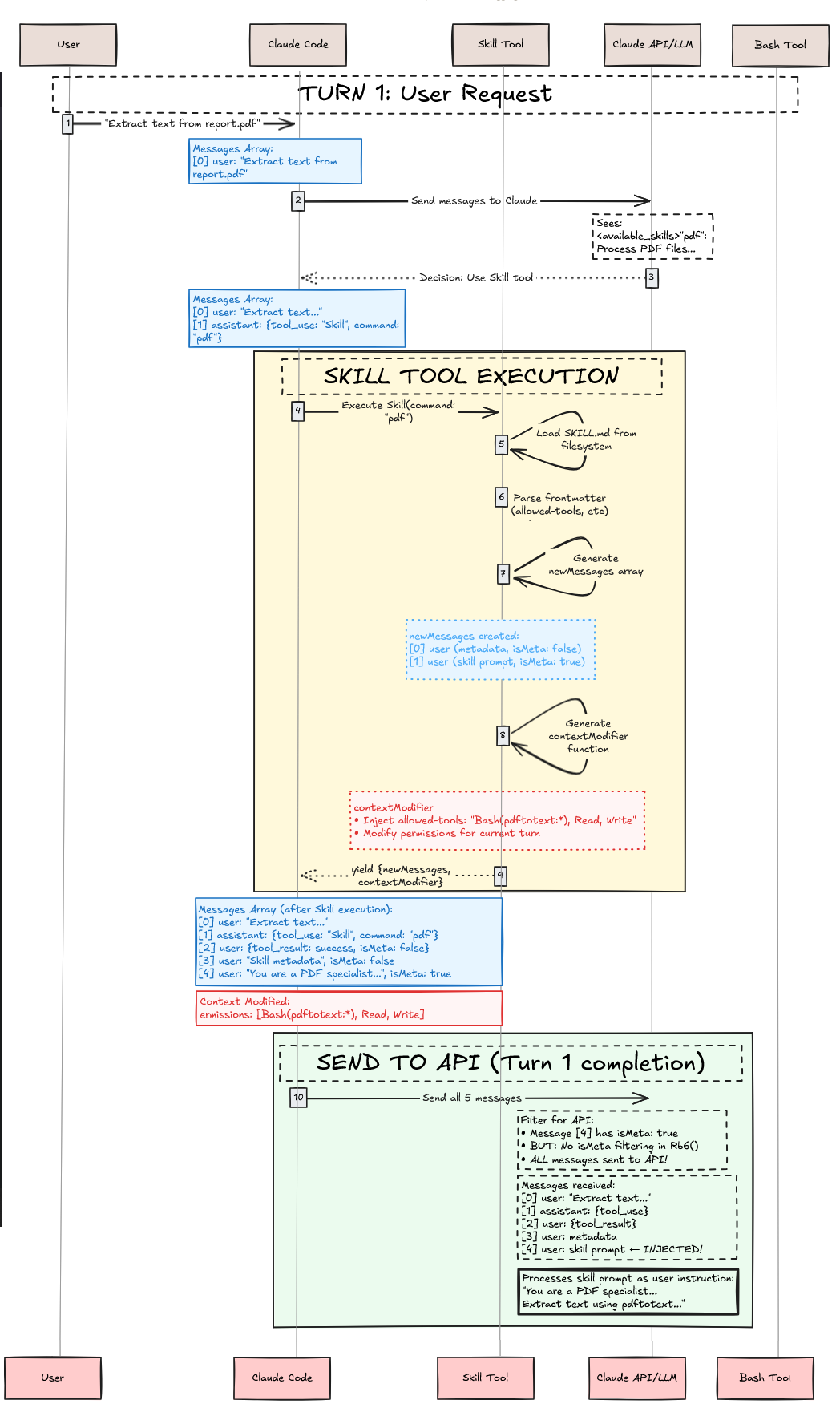
以上展示了我们到目前为止所做的工作。执行上下文修改器被应用,预批准了 Bash(pdftotext:*)、Read 和 Write 用于后续工具调用。请求被发送到 Anthropic API。这完成了 skill 执行。如果是普通工具,我们就完成了。然而,skills 不同。Agent skill 只注入了对话上下文和执行上下文。这意味着我们仍然需要用所有这些注入的上下文调用 Claude agent 来完成用户的请求!
Claude 收到带有注入对话上下文的 API 响应。Skill 提示词已经改变了 Claude 的行为,为其提供了:
- 专用的 PDF 处理指令(对话上下文)
- 预批准的
Bash(pdftotext:*)、Read和Write工具访问权限(执行上下文) - 清晰的要遵循的工作流(对话上下文)
Claude 处理上下文并遵循 pdf skill 的工作流:
I'll extract text from report.pdf. Let me process the file.
[Following pdf skill's instructions]1. Validate that report.pdf exists2. Run pdftotext command to extract text3. Read the output file4. Present the extracted text to you
Claude 使用 Bash 工具(预批准,无需用户提示):
{ "type": "tool_use", "id": "toolu_456def", "name": "Bash", "input": { "command": "pdftotext report.pdf output.txt", "description": "使用 pdftotext 从 PDF 提取文本" }}Bash 工具成功执行,返回结果。然后 Claude 使用 Read 工具读取输出文件,并向用户展示提取的文本。Skill 已成功通过将指令注入对话上下文和修改执行上下文的工具权限,引导 Claude 完成专用的 PDF 提取工作流。
结论:心智模型回顾
Section titled “结论:心智模型回顾”Claude Code 中的 Skills 是基于提示词的对话和执行上下文修改器,通过元工具架构工作:
关键要点:
- Skills 是
SKILL.md文件中的提示词模板,不是可执行代码 - Skill 工具(大写 S)是
tools数组中的元工具,管理各个 skills,不在系统提示中 - Skills 通过注入指令提示词(通过
isMeta: true消息)修改对话上下文 - Skills 通过更改工具权限和模型选择修改执行上下文
- 选择通过 LLM 推理发生,而非算法匹配
- 工具权限限定在 skill 执行范围内,通过执行上下文修改
- Skills 每次调用注入两条用户消息——一条用于用户可见的元数据,一条用于发送给 API 的隐藏指令
优雅的设计: 通过将专业知识视为_修改对话上下文的提示词_和_修改执行上下文的权限_,而不是_执行的代码_,Claude Code 实现了传统函数调用难以实现的灵活性、安全性和可组合性。
@article{ leehanchung_bullshit_jobs, author = {Lee, Hanchung}, title = {Claude Agent Skills: A First Principles Deep Dive}, year = {2025}, month = {10}, day = {26}, howpublished = {\url{https://leehanchung.github.io}}, url = {https://leehanchung.github.io/blogs/2025/10/26/claude-skills-deep-dive/}}原文链接: https://leehanchung.github.io/blogs/2025/10/26/claude-skills-deep-dive/